

The organisation administrator role – LNAAT
Te tūnga whakahaere me te whakarite – LNAAT
At least one person from your organisation must be designated as an organisation administrator in the Literacy and Numeracy for Adults Assessment Tool (LNAAT). This page explains the role’s responsibilities, and how to set it up.
At least one person from your organisation must be designated as an organisation administrator in the Literacy and Numeracy for Adults Assessment Tool (LNAAT). This page explains the role’s responsibilities, and how to set it up.
Organisation administrators and educators have different levels of access within the LNAAT.
This means organisation administrators have some extra functions that educators do not. For instance, the educators tab and administration tab are only viewable for people that hold the organisation administrator role. If you are logged in as an educator or restricted educator, you cannot see these tabs.
Organisation administrator privileges
Organisation administrators are users of the system who have special privileges relating to reporting, creating and viewing user profiles and creating “organisation groups”. An organisation administrator can control the access privileges of educators by creating organisation groups and assigning learners and educators to them.
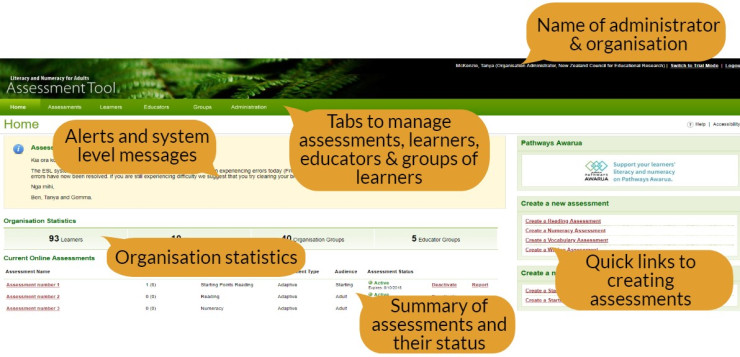
Below is an example of what an organisation administrator sees when they log in.
Adding learners
Only organisation administrators can add learners to the LNAAT.
A critical decision for an organisation is to determine which learners will be assessed. Answering these questions will help inform that decision:
- How is the organisation going to use the assessment information to strengthen a learner’s reading, writing or numeracy?
- When is it most appropriate to assess a learner?
There are two ways to add learners to the LNAAT:
- Upload from a CSV file. Do this on the administration tab.
- Create the learners from within the LNAAT. Do this on the learners tab.
You can find example upload files and instructions in the “Key documents” section at the bottom of this page. Note that there are three kinds of upload file:
- one which uploads learners only:
- Learner only upload
- one which uploads learners and sorts them into groups:
- How to create and import bulk learner – group upload csv file
- How to create and import bulk – learner upload csv file
- Learner group assign upload
- one which uploads learners and educators and sorts them into groups:
- How to create and import bulk learner group – educator upload csv file
- Learner group educators assign upload
Creating groups
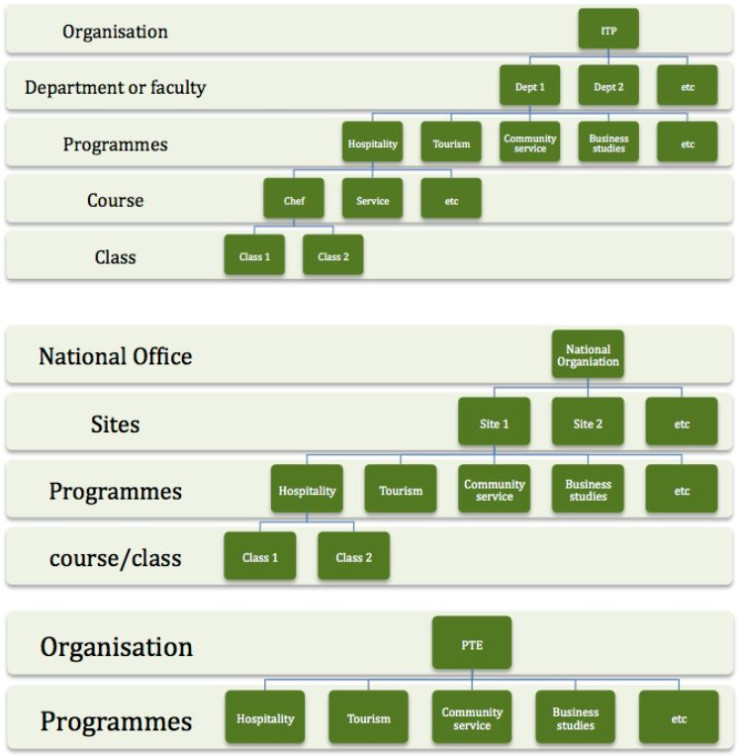
Organisation administrators are responsible for creating groups of learners within the LNAAT. Groups are essential for reporting and for allowing educators to see only the learners they are working with. In essence, creating a group in the LNAAT is like creating an empty container. Once a group is created, you can then add learners and educators to it.
Thinking about how programmes and courses are structured within your organisation is central to deciding how to group learners in the LNAAT. For example:
Creating educator profiles
Creating educator profiles in the LNAAT is a key function of the organisation administrator. Educators at your organisation will not be able to log in until their profile is created. To create a profile, click on the educator tab and select “create educator” on the right-hand side.
Note: If you do not know the new educator's ESL username, the system will generate an alphanumeric educator code. The educator will need to enter this the first time they log in.
Key documents
- How to create and import bulk – learner upload csv file (PDF 330 KB)
- How to create and import bulk learner group – educator upload csv file (PDF 395 KB)
- How to create and import bulk learner – group upload csv file (PDF 371 KB)
- Learner only upload (CSV 547 bytes)
- Learner group assign upload (CSV 870 bytes)
- Learner group educators assign upload (CSV 1 KB)
- Ethnicity codes (PDF 53 KB)