The educator and restricted educator roles – LNAAT
Ngā tūnga kaiwhakaako me te kaiwhakaako whai herenga – LNAAT
An “educator” in the Literacy and Numeracy for Adults Assessment Tool (LNAAT) is any person involved in creating and setting assessments for the learner with the primary purpose of informing teaching and learning.
An “educator” in the Literacy and Numeracy for Adults Assessment Tool (LNAAT) is any person involved in creating and setting assessments for the learner with the primary purpose of informing teaching and learning.
Depending on the type of organisation, the educator may be a tutor, teacher, lecturer, workplace trainer, assessor or manager.
The educator plays an important role in effectively using the LNAAT and obtaining information from it. As well as appropriately creating an assessment, educators have a role in ensuring that learners understand why they are completing the assessment and how the assessment information will be used to strengthen their literacy and/or numeracy.
Gaining educator access
For an educator to access the LNAAT:
- the organisation must be set up to use the LNAAT, then
- the organisation administrator must create an educator profile for them. For instructions on how to do this, see The organisation administrator role – LNAAT.
Educators also need to complete an Education Sector Logon (ESL) application to have their identified role for the LNAAT added to an existing or new ESL profile.
Download ESL logon request form (PDF 437 KB).
Send completed forms to the Education Service Desk (details on the ESL form).
An educator always logs on via their ESL. If an educator profile is created without their ESL username listed, the system will generate a one-time use code called an Educator Code, which will be used the first time the new educator logs in.
Note: As of February 2026, the LNAAT no longer requires an email address for educator roles. Organisation administrators will need to provide new educator users with their Educator Code (if required) outside of the Assessment Tool application.
What can educators do?
Users with educator access can:
- create assessments, assign learners to assessments, and disseminate learner codes
- view learner reports
- view assessment comparison reports and gain reports
- view latest and highest learner reports through the data engine extract
- create and maintain their own learner groups.
Important: A user with educator access can only “see” those learners that they have been attached to through the Groups function. When the organisation administrator creates the educator profile, they need to add the educator to any groups of learners they will be working with. The educator can only access the learners they have been attached to through the group system. Both learners and educators can be attached to any number of groups.
Gaining restricted educator access
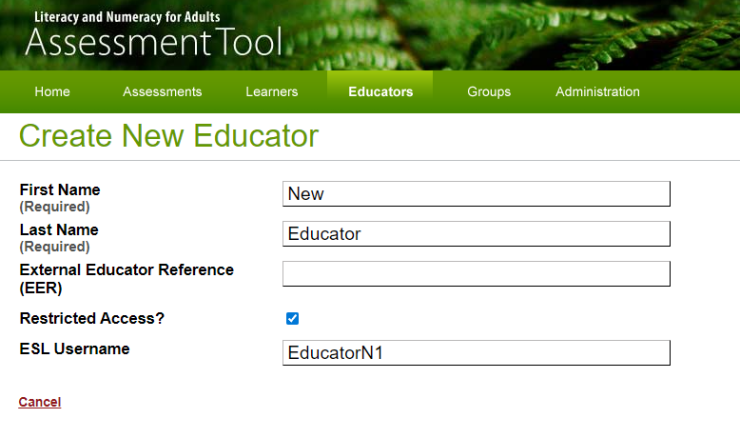
The restricted educator role is given to a user who will only be marking printed assessments within the Assessment Tool. This role is not recommended for teaching staff.
To create restricted educator access for a user, the organisation administrator needs to create an educator profile as usual, then check the restricted educator box. (See below.)